Imagine dropping into Bermuda with a name that no one can read — pure, clean, and totally invisible. That's the mysterious, head-turning look every serious player wants! If you've ever wondered exactly how to make an invisible name in Free Fire, you're in the right place. An invisible name (also called a blank name Free Fire style) makes your profile look sleek, rare, and impossible to copy. In this guide, you'll learn the exact invisible characters that actually work, the step-by-step process, and how to fix every error along the way. Let's get you that blank IGN today!
🎯 Key Takeaways
• An invisible name Free Fire uses special Unicode characters that display as empty space.
• The most reliable trick is the Hangul Filler character (U+3164) — copy it, paste it, done!
• You'll need a rename card or 390 diamonds to change your nickname.
• A plain blank space (U+0020) usually gets rejected as "invalid nickname."
• Zero-width characters can work but are less stable across updates.
What Is an Invisible Name in Free Fire?
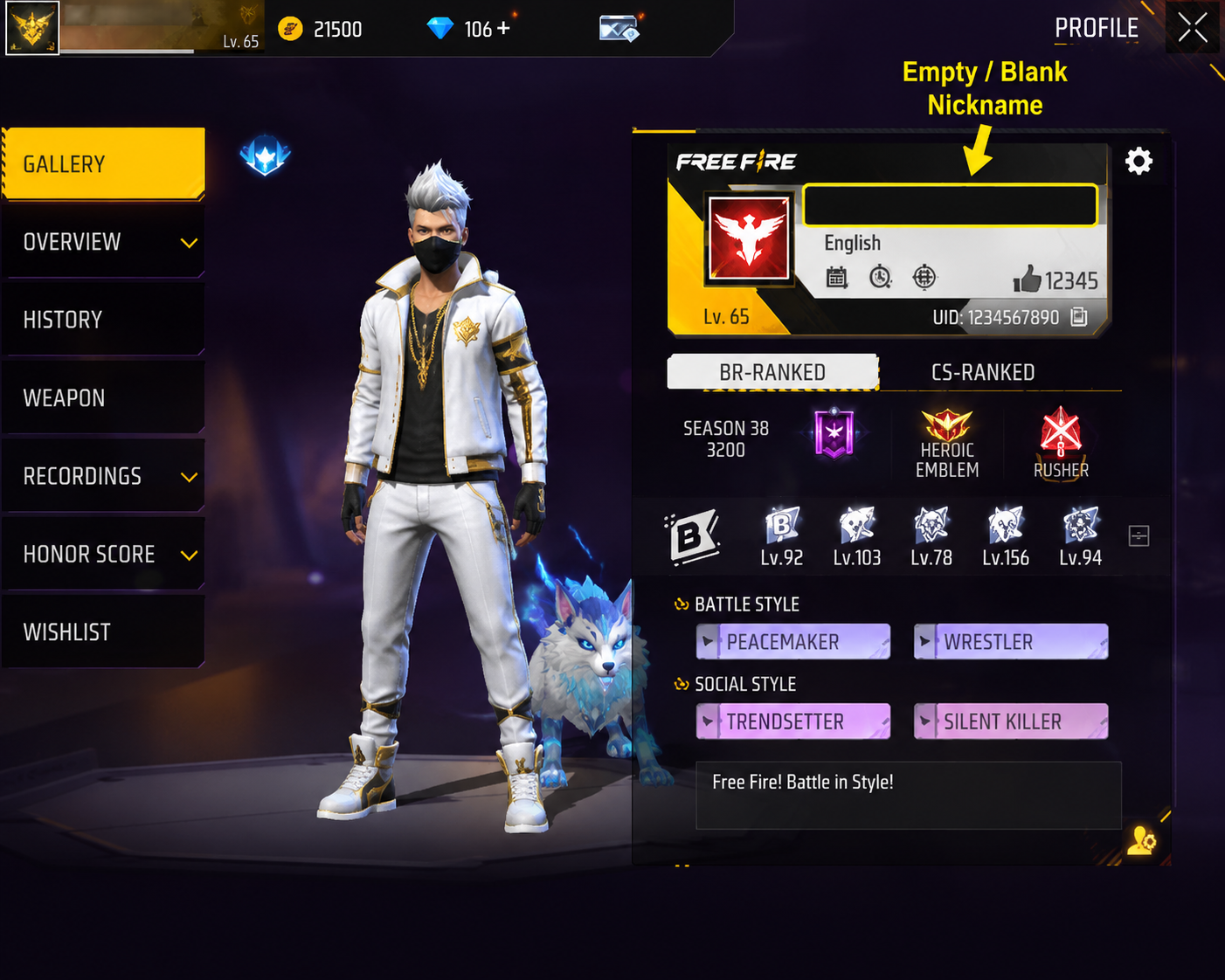
An invisible name is a nickname that appears completely empty on your profile, scoreboard, and in-game display. Instead of letters or numbers, your IGN shows nothing at all — just a clean, blank space where a name should be.
This works because Free Fire, like most apps, reads text using Unicode — the global standard that assigns a code to every character. Some Unicode characters are technically valid but display as invisible whitespace. When you paste one of these into your nickname field, the game accepts it as a real name, yet nobody sees anything!
The result is a mysterious, minimalist profile that instantly stands out. It's one of the easiest and coolest customizations in the game.
Why Players Use Invisible Nicknames
There are plenty of great reasons players love the blank name look:
- Unique style: A blank name is rare and eye-catching. Most players have never seen one, so yours instantly looks pro.
- Mystery factor: Enemies can't call you out by name in the lobby or after a knock. You stay anonymous and low-key.
- Clean profile aesthetic: Combined with a stylish guild and cool character bundle, an empty IGN looks sharp and premium.
- Standing out on leaderboards: A blank entry among a wall of names grabs attention immediately.
- Trend appeal: Streamers and top ranked players use invisible IGNs, so it's become a status symbol.
It's a small change with a big impact — and it costs almost nothing to pull off!
Is an Invisible Name Allowed in Free Fire?
Good news: using an invisible name is generally safe and widely used. Millions of players run blank nicknames without any issue. You're simply using valid Unicode characters that Garena's system accepts.
Read also: → How to Make a Funny Free Fire Name: 7 Formulas + 250 Examples
That said, always play smart. Invisible names themselves don't break any rules, but you should never combine them with third-party apps, hacks, or unofficial tools that promise "instant" invisible names — those can risk your account. Stick to the manual copy-paste method in this guide, which uses only legitimate characters.
For the official word on account rules, check the Garena Free Fire support pages. When in doubt, keep it simple and manual.
How to Make an Invisible Name in Free Fire (Step-by-Step)
Ready for the easy part? Here's exactly how to get an invisible name in Free Fire, step by step:
- Copy the invisible character. Scroll to the Copy Invisible Character section below and tap the copy button (or long-press and copy the character between the brackets).
- Open Free Fire and let it load fully to the lobby.
- Tap your profile icon in the top-left corner of the screen.
- Select the edit (pencil) icon next to your current nickname.
- Clear your existing name completely from the text field.
- Paste the invisible character into the empty field. The field should look blank, but the character is there!
- Confirm the change. You'll need a rename card or 390 diamonds (more on that below).
- Tap OK and return to your profile. Your name is now invisible!
That's it. The whole thing comes together in minutes, and you'll love how clean your profile looks!
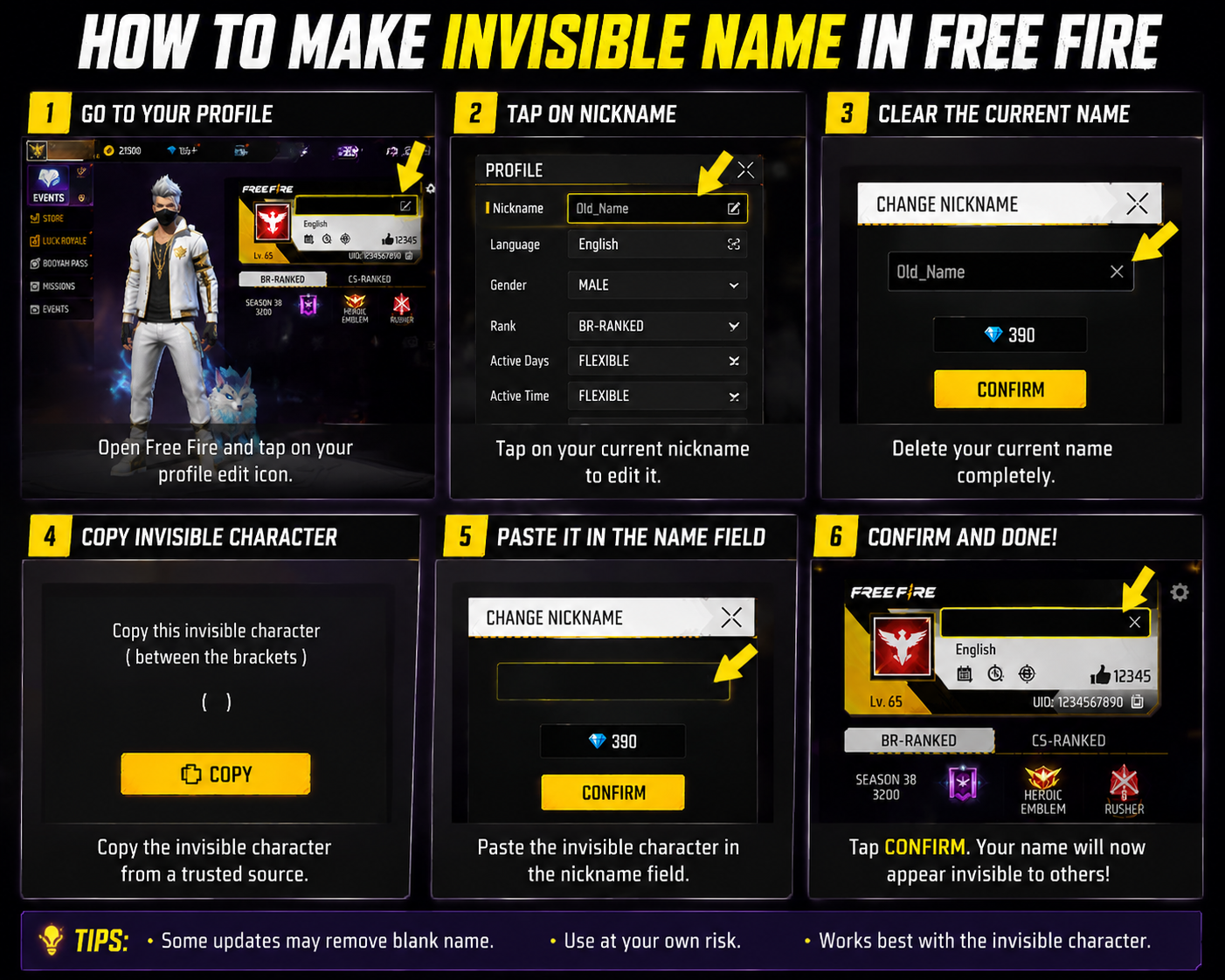
Copy the Invisible Character
Here's the heart of the guide — the actual characters you can copy. Paste one carefully into your nickname field.
✅ Best option — Hangul Filler (U+3164):
ㅤ
(The highlighted box above holds one Hangul Filler. It looks empty, but it's there!)
This is the most reliable invisible character for Free Fire. It's a legitimate, widely supported Unicode character that the game reads as valid text while displaying nothing. If you only try one method, make it this one!
Other characters to try:
| Character | Unicode | Result in Free Fire |
|---|---|---|
| Hangul Filler | U+3164 | ✅ Best and most stable |
| Zero-Width Joiner | U+200D | ⚠️ Sometimes rejected |
| Zero-Width Space | U+200B | ⚠️ Often rejected |
| Regular Space | U+0020 | ❌ Usually "invalid" |
| Braille Blank | U+2800 | ⚠️ Works but may show a tiny dot |
Pro tip: If a single character gets rejected, try pasting it twice or three times in a row. The extra length often satisfies the game's minimum name requirement while staying invisible.
For deeper reading on how these codes work, the Unicode Consortium is the official authority.
Why the Hangul Filler Works When a Space Doesn't
It comes down to how Unicode classifies each character. You can't see the difference, but a nickname check can:
| Character | Unicode | Unicode classifies it as |
|---|---|---|
| Hangul Filler | U+3164 | Letter |
| Braille Pattern Blank | U+2800 | Symbol |
| Zero Width Space | U+200B | Format character |
| Space | U+0020 | Space |
Name checks commonly trim spaces and reject names that are blank or made only of formatting characters, while a letter gets through. That is the most likely reason the Hangul Filler succeeds where a plain space shows “invalid”, and it lines up with the results in the table above.
Before you spend your free rename or your diamonds, paste what you copied into the Paste Test on our invisible character page. It tells you which invisible character it found, so you'll know you really copied a Hangul Filler and not an empty clipboard.
How to Change Your Free Fire Nickname
Before your invisible name goes live, you need to unlock the rename option. Here's the deal:
- First name change is free for brand-new accounts. If you haven't used yours yet, lucky you!
- After that, you'll need a Rename Card or 390 diamonds to change your nickname.
- Rename cards sometimes appear as event rewards, login bonuses, or store items — so keep an eye out for free ones!
To use one: open your profile, tap the edit icon, paste your invisible character, and confirm. If you have a rename card in your inventory, the game applies it automatically. If not, it'll charge 390 diamonds.
Want more nickname inspiration once you've mastered the invisible look? Check out our Stylish Free Fire Names and Cute Free Fire Nicknames collections!
Different Invisible Character Methods
Not every invisible trick is created equal. Here's how the three main methods stack up:
1. Unicode Character (Hangul Filler)
The gold standard. It's stable, valid, and survives most game updates. This is the method I recommend to every player.
- Pros: Reliable, easy, widely supported
- Cons: None worth mentioning!
2. Blank Space (Regular Space)
Just hitting the spacebar. Tempting, but Free Fire almost always rejects a plain space as an invalid nickname.
- Pros: Nothing to copy
- Cons: Rarely works, gets rejected constantly
3. Zero-Width Character
Characters like the zero-width space or joiner. These can work but behave inconsistently across devices and updates.
- Pros: Truly invisible when accepted
- Cons: Often rejected, unstable after patches
Comparison Table
| Method | Reliability | Difficulty | Best for |
|---|---|---|---|
| Unicode (U+3164) | ⭐⭐⭐⭐⭐ | Very Easy | Everyone |
| Blank Space (U+0020) | ⭐ | Easy | Not recommended |
| Zero-Width (U+200B/D) | ⭐⭐⭐ | Medium | Backup option |
The takeaway is simple: start with the Hangul Filler. It's the most dependable choice by a mile!
Common Problems
Ran into a snag? Don't worry — every issue has a quick fix.
❌ "Invisible name not working"
The character probably didn't copy fully. Re-copy it carefully, making sure you grab only the invisible character with no extra spaces around it.
❌ "Invalid nickname"
Your name is too short. Paste the invisible character two or three times to meet the minimum length requirement.
❌ "Character rejected"
Free Fire blocked that specific character. Switch to the Hangul Filler (U+3164) — it has the highest acceptance rate.
❌ "Name already taken"
Yes, invisible names can clash! Add a small variation — like an extra invisible character or a tiny symbol from our : Free Fire Symbols page — to make yours unique.
Best Tips
Level up your invisible name game with these expert tips:
- Always test with U+3164 first. It saves time and diamonds.
- Combine invisible characters with symbols for a semi-hidden, stylish look.
- Copy from a trusted source to avoid hidden junk characters that break the paste.
- Save your rename card for a working attempt — don't waste diamonds on a rejected name.
- Refresh the app if your name shows old text after the change.
- Experiment with our Free Fire Fonts to mix invisible spacing with fancy lettering!
Common Mistakes
Steer clear of these frequent slip-ups:
- Using a plain spacebar space — it almost never works.
- Copying extra characters by accident, which triggers "invalid nickname."
- Using shady apps that promise instant invisible names and risk your account.
- Not confirming the change, so the name never actually applies.
- Giving up after one rejection — most fails just need the character pasted a couple more times!
🎤 Voice Search: How Do I Make My Free Fire Name Invisible?
Quick answer: Copy the Hangul Filler character (U+3164), open your Free Fire profile, tap edit, clear your name, paste the character, and confirm with a rename card or 390 diamonds. Your name will appear completely blank!
Expanded: The trick works because U+3164 is a valid Unicode character that displays as empty space. If the game rejects a single character for being too short, paste it two or three times. This is the fastest, most reliable way to get an invisible name that survives updates and works on both Android and iOS.
People Also Ask
1. How do I make an invisible name in Free Fire?
Copy the Hangul Filler (U+3164), paste it into your nickname field, and confirm with a rename card.
2. Is a blank name Free Fire allowed?
Yes. Blank names use legitimate Unicode characters and are safe to use.
3. Why is my invisible name showing "invalid"?
Your name is too short. Paste the invisible character multiple times to meet the length requirement.
4. Do I need diamonds for an invisible name?
You need a rename card or 390 diamonds — unless it's your account's free first name change.
5. Which invisible character works best in Free Fire?
The Hangul Filler (U+3164) is the most reliable and widely accepted.
6. Can I use an invisible name on iOS and Android?
Yes! The copy-paste method works on both platforms.
7. Why does it say my invisible name is already taken?
Other players use the same character. Add an extra invisible character or symbol to make it unique.
8. Does a regular space work as an invisible name?
Usually not. Free Fire rejects a plain space (U+0020) as invalid.
9. Will an invisible name get me banned?
No, as long as you use manual copy-paste and avoid third-party hacks.
10. Can I combine an invisible name with symbols?
Absolutely! Mixing invisible characters with symbols creates a cool, partly hidden style.
11. How do I fix a "character rejected" error?
Switch to the Hangul Filler (U+3164), which has the highest success rate.
Conclusion
And there you have it — the complete, no-fuss guide on how to make an invisible name in Free Fire! You now know exactly which characters work, the simple steps to apply them, and how to fix every common error along the way. Start with the trusty Hangul Filler (U+3164), paste it a couple of times if needed, and enjoy your sleek, mysterious blank IGN!
Ready to take your profile to the next level? Try our Free Fire Name Generator to create stylish invisible names, symbols, and fonts instantly — no guesswork required. Go make your name unforgettable by making it invisible!
Want to pair your invisible name with a style? Grab more decoration from the symbols collection, style visible letters with the fancy text generator, or find rare characters on the emoji page.