Stylish text generators can turn ordinary text such as Hello World into something that appears bold, italic, script-like, outlined, mathematical, or decorative. This can make usernames, social media bios, gaming names, captions, and profile descriptions look more distinctive.
But there is an important technical detail behind these tools: most so-called “Unicode fonts” are not actually fonts.
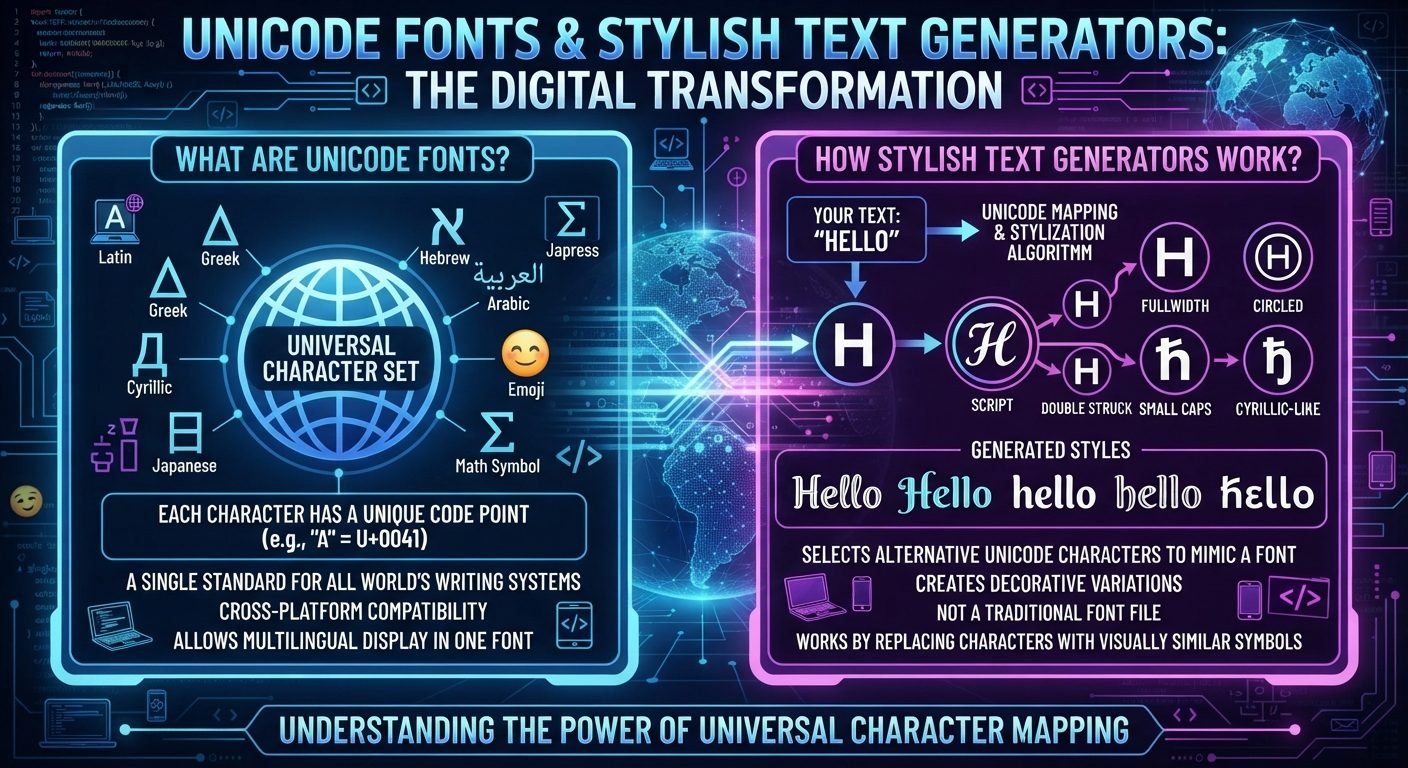
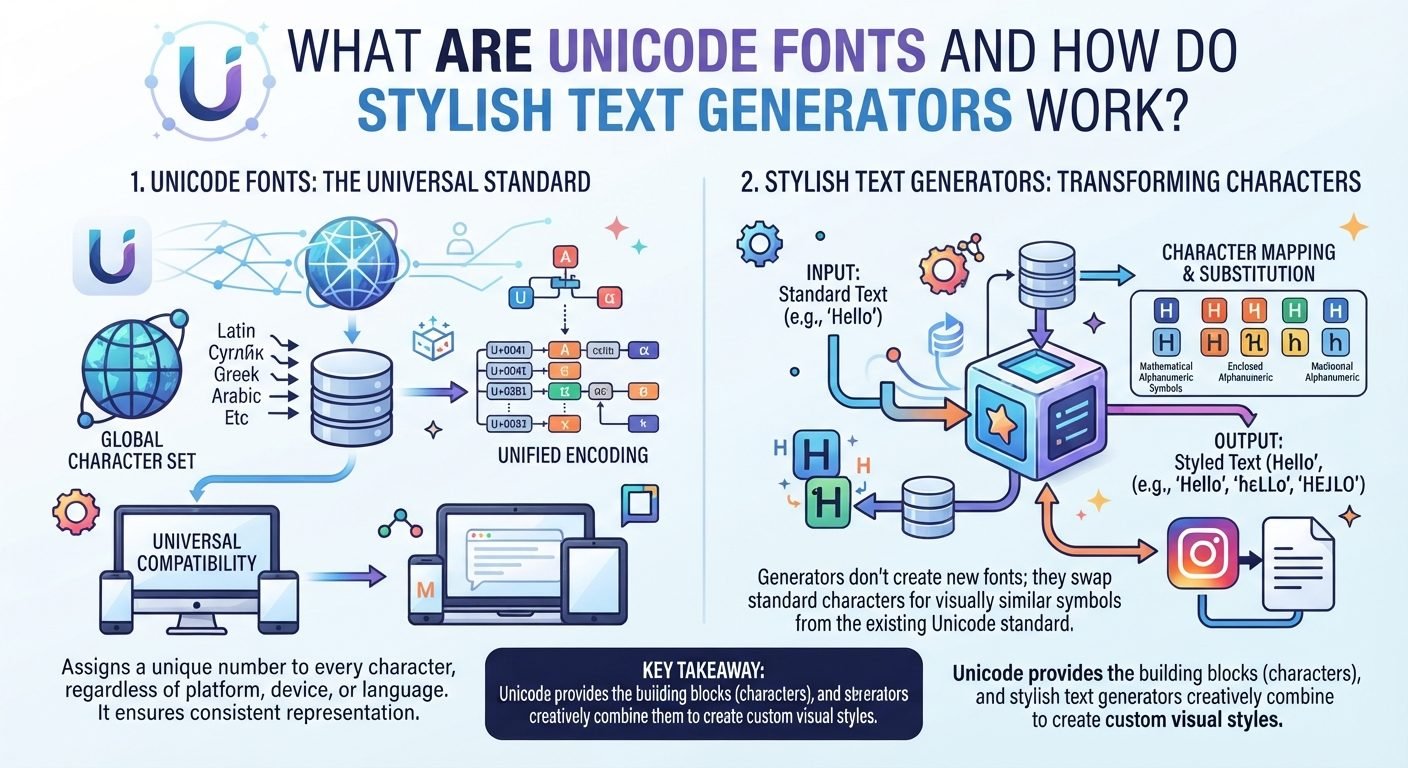
Unicode is a character encoding standard. It assigns characters unique code points so computers can store, process, and exchange text consistently. Fonts, on the other hand, determine how those characters are visually rendered on a screen. A stylish text generator often creates the appearance of a different font by replacing ordinary characters with different Unicode characters that happen to have a similar visual style.
Understanding this difference makes it much easier to understand why stylish text works on some websites, why it sometimes breaks, and why certain characters may look different on different devices.
Read also: → Stylish Font Generator — 50+ Unicode Fonts Free
What Is Unicode?
Unicode is a universal standard for representing text.
Computers ultimately need numerical representations of characters. Unicode provides a standardized system in which characters are assigned unique numerical values called code points.
For example, the ordinary capital letter A is represented by the Unicode code point U+0041.
The important idea is that Unicode does not only cover the English alphabet. It includes characters from many writing systems, along with punctuation, mathematical symbols, technical symbols, emoji, arrows, and many other types of characters.
This allows computers and software to handle text from languages around the world using a common character system.
Without a system such as Unicode, different applications and devices could interpret the same numerical data differently.
Unicode Is Not a Font
This is the first distinction to understand.
Unicode is not a font.
Unicode defines characters and their encoding. A font contains visual designs, called glyphs, that are used to display those characters.
For example, the character A is an abstract character identified by Unicode. A font can display that character in many visual forms:
Ain a serif fontAin a sans-serif fontAin a bold fontAin an italic fontAin a decorative typeface
The underlying character can remain the same while its appearance changes.
This is why changing the font in a word processor does not normally change the actual text characters.
Unicode itself does not dictate that a particular character must look a certain way. The rendering system and font determine its visual appearance.
What Is a Glyph?
A glyph is the visual representation used to display a character.
This distinction is especially important when talking about stylish text.
The character is the underlying encoded item. The glyph is what you see.
Imagine the letter A.
The computer stores a Unicode character representing A. When the text needs to be displayed, the operating system, application, and font work together to determine what shape should appear on the screen.
The same Unicode character can therefore have very different visual appearances depending on the font.
This is different from a stylish text generator that replaces one Unicode character with another.
What People Mean by "Unicode Fonts"
The phrase “Unicode font” is commonly used online, but it can be misleading.
People often use it to describe text that looks like it came from a different font:
Hello
might become something visually similar to:
𝓗𝓮𝓵𝓵𝓸
or:
𝐇𝐞𝐥𝐥𝐨
or:
𝙷𝚎𝚕𝚕𝚘
These examples may look like different fonts, but the characters are not necessarily ordinary letters rendered with a different font.
Instead, many of the characters come from Unicode blocks containing mathematical alphanumeric symbols or other specialized characters.
The result is still plain Unicode text, but the individual characters have changed.
That is the trick behind many online stylish text generators.
How Stylish Text Generators Work
A typical stylish text generator performs a relatively simple transformation.
You enter:
Hello
The generator has a predefined mapping between ordinary characters and alternative Unicode characters.
For example, it might conceptually map:
H → 𝐇
e → 𝐞
l → 𝐥
o → 𝐨
The generator then outputs:
𝐇𝐞𝐥𝐥𝐨
You are not necessarily changing the font being used by Instagram, Discord, TikTok, or another website.
Instead, you are giving the platform a different sequence of Unicode characters.
The receiving application then renders those characters using whatever fonts it has available.
This is why you can often copy stylish text from a website and paste it into a social media profile without installing a font.
The Basic Process
A stylish text generator can be understood as a simple series of steps.
Step 1: You enter ordinary text
For example:
Gaming Zone
Step 2: The generator identifies each character
It reads the letters individually or according to a predefined conversion system.
Step 3: It looks up alternative characters
The generator checks its internal mapping.
For example:
G might correspond to a mathematical bold character.
a might correspond to another mathematical bold character.
The same happens for the remaining letters.
Step 4: It produces a new Unicode string
Instead of returning the original characters, it outputs their Unicode alternatives.
Step 5: You copy and paste the result
You can then paste the text into an application that accepts those characters.
The destination platform decides whether and how those characters will be rendered.
Why Stylish Text Does Not Require Font Installation
Traditional custom fonts usually require a font file.
For example, a designer might install a .ttf or .otf font on a computer and then use it in a design application.
A Unicode-based stylish text generator works differently.
The generated text itself contains Unicode characters. The destination application does not necessarily need the original generator or a custom font file.
It simply receives a sequence of characters.
If the destination system has a suitable glyph available for those characters, it can display them.
This is one reason stylish Unicode text became popular for social media profiles and usernames.
Unicode Characters Can Look Like Different Fonts
Some Unicode characters were designed with mathematical or specialized typographic purposes.
Certain groups of characters have visual relationships that resemble familiar typography styles.
For example, Unicode contains mathematical alphanumeric symbols that include variants resembling:
- Bold
- Italic
- Bold italic
- Script
- Fraktur
- Double-struck
- Sans-serif
- Monospace
Stylish text generators can use these characters to create text that visually resembles those styles.
However, it is important not to think of them as simply different versions of the normal alphabet.
They are separate Unicode characters with their own identities and properties.
Why Some "Fonts" Work Better Than Others
Not every stylish text style is equally practical.
Some styles use characters that are widely supported across modern devices and applications. Others depend on less common characters or complicated sequences.
This affects how the text appears.
For example, one style may display correctly on:
- Android
- iPhone
- Windows
- macOS
- Web browsers
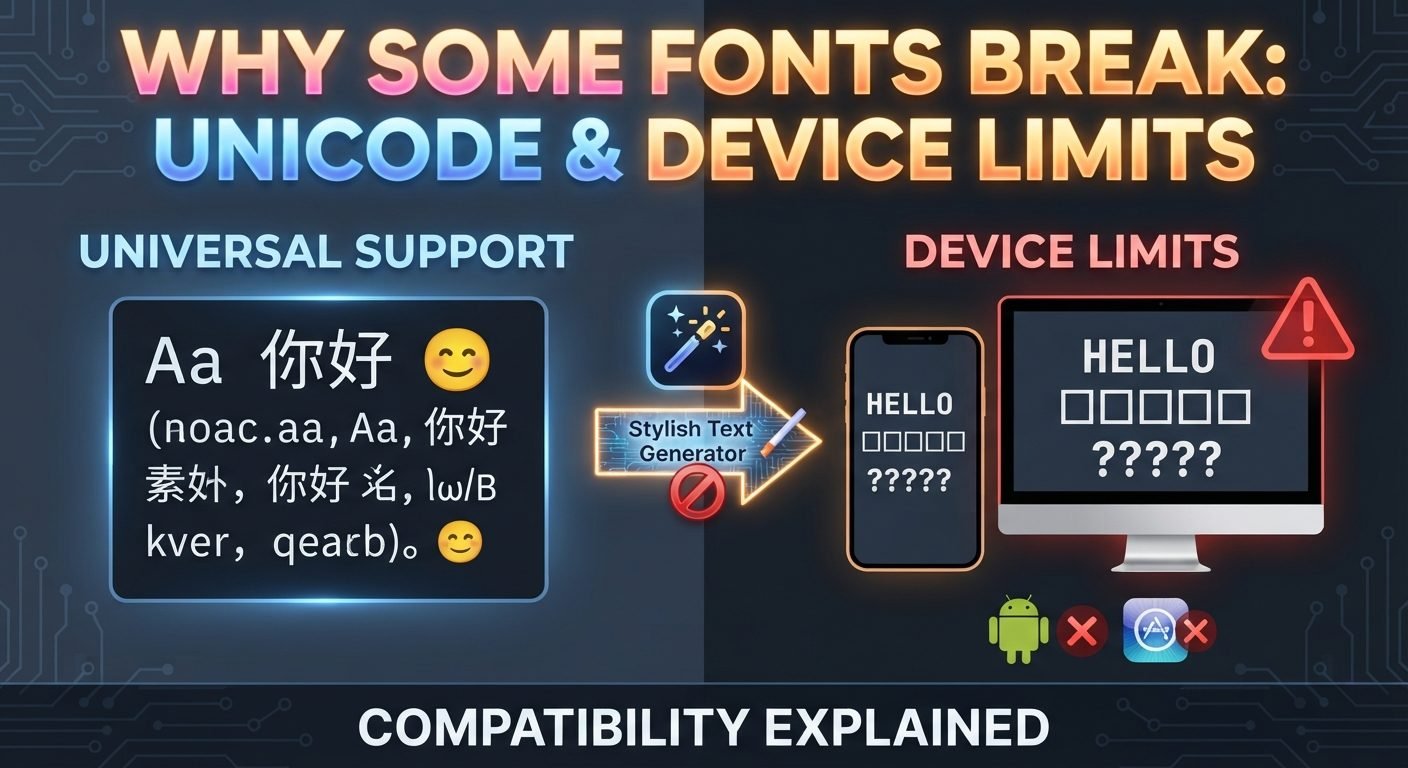
while another may show missing-character boxes or unexpected symbols in certain environments.
The problem is not necessarily that the generator is broken.
The destination system may simply lack an appropriate glyph or may process the characters differently.
What Is a Missing-Character Box?
You may have seen a square box, question mark, or replacement symbol where a character should be.
This usually means the system could not properly display the requested character.
The underlying text may contain a valid Unicode character, but the software or font being used may not have an appropriate glyph.
This is one of the biggest limitations of stylish Unicode text.
A generator can produce a valid sequence of characters, but it cannot guarantee that every application will display them identically.
Why the Same Stylish Text Can Look Different
Unicode defines characters, but it does not define one universal visual design for every character.
The rendering system determines how those characters appear.
That means the same Unicode text can have slightly different visual appearances depending on:
- Operating system
- Application
- Browser
- Available fonts
- Font fallback
- Rendering engine
- Device
- Text size
The underlying characters can remain identical even when the visual appearance changes.
This is normal.
Unicode Text vs Real Font Styling
Consider two different approaches.
Real font styling
You type:
Hello
Then select a font such as a decorative typeface.
The text remains Hello, but the application renders it using that font.
Unicode styling
You type:
Hello
A generator converts it into something like:
𝓗𝓮𝓵𝓵𝓸
Now the actual characters have changed.
This distinction matters because social media platforms usually do not let you upload a custom font into every text field.
Unicode text can sometimes work where traditional font formatting is unavailable because the styling information is represented through the characters themselves.
Why Copy and Paste Is So Important
Stylish text generators are primarily designed around copy and paste.
You do not need to understand the individual Unicode code points to use one.
The normal workflow is:
- Enter your text.
- Select a style.
- Generate the result.
- Copy it.
- Open the target application.
- Paste it.
- Check how it appears.
This is convenient because the generated text behaves like text rather than an image.
However, “behaves like text” does not mean every platform will treat it exactly like ordinary letters.
Why Some Platforms Reject Stylish Characters
Social media platforms can impose restrictions on usernames, handles, names, search fields, or other account identifiers.
A platform might allow many Unicode characters in a display name but permit only a limited set in a unique username.
There are several reasons for this.
Search and identification
A username often needs to be easy for the platform to identify and process.
Security
Unicode contains many characters that can look similar to characters from other scripts. This can create opportunities for impersonation or confusion.
Technical compatibility
Platforms need consistent rules for storing, comparing, searching, and displaying usernames.
Moderation
Standardized username rules can make account identification and moderation easier.
For this reason, a stylish text generator should never be assumed to work everywhere.
Display Names Are Often More Flexible
One useful distinction is between an account identifier and a display name.
A username may need to be unique and may have strict character requirements.
A display name is usually intended primarily for visual identification and may permit more characters.
This creates an important practical strategy.
You can keep your username simple:
NovaCreates
while using a more decorative display name where supported:
✦ Nova Creates ✦
This gives you a recognizable identifier without sacrificing visual style.
Why Stylish Text Can Be Difficult to Search
A stylish Unicode name can be visually memorable but technically inconvenient.
Suppose your ordinary name is:
Nova
You convert it into a decorative Unicode version.
A person who sees it may remember how it looks but not know which Unicode characters were used.
Typing the ordinary word into search may not always produce exactly the same results as searching for the styled characters.
This is particularly relevant for creators and businesses that want people to find their accounts easily.
A good balance is to keep the core identity simple enough that people can still recognize it.
Unicode Does More Than Create Stylish Text
Stylish text is only a tiny part of what Unicode does.
Unicode exists primarily to provide a consistent way to represent written characters and symbols in digital systems.
It supports:
- English
- Arabic
- Chinese
- Japanese
- Korean
- Cyrillic scripts
- Indic scripts
- African writing systems
- Historical scripts
- Mathematical notation
- Technical symbols
- Punctuation
- Emoji
- Many other characters
The ability to create decorative text is simply one visible use of the enormous Unicode character repertoire.
Combining Characters Are Another Technique
Not all unusual text comes from replacing ordinary letters with alternate Unicode characters.
Unicode also supports combining characters.
A combining character is placed alongside another character and can modify how the sequence is rendered.
For example, a base letter can be followed by a combining mark that appears above or below it.
This makes it possible to represent certain accented or modified forms using sequences of characters rather than one precomposed character.
Some generators use combining marks to create decorative effects.
However, excessive combining marks can produce messy or unreliable results.
Text may become difficult to read, copy, search, or display consistently.
Why Some Stylish Text Looks "Glitched"
Generators sometimes offer styles that place marks above, below, or around ordinary letters.
These can create effects that look distorted or “glitched.”
Technically, some of these effects can involve combining characters.
For example, multiple combining marks can be attached to a base character.
This can produce something visually like:
H̷e̸l̵l̶o̷
The exact appearance depends on the characters and rendering system.
While this can be useful for certain visual effects, it is usually less practical for usernames or important profile information.
The Difference Between Unicode and ASCII
ASCII is an older character encoding system that primarily represents basic Latin letters, numbers, punctuation, and control characters.
Unicode extends far beyond that limited set.
For example, ordinary ASCII can represent:
A
Unicode can represent a much wider range of characters and scripts.
This expanded character repertoire is what makes modern multilingual computing possible.
Stylish text generators often take advantage of characters that are outside basic ASCII.
Why Some Stylish Letters Are Actually Different Characters
This is one of the most interesting aspects of Unicode styling.
Suppose you see:
A
and another character that visually resembles a bold A.
They may look like the same letter in different visual styles, but they can have different Unicode identities.
The first may be the ordinary Latin capital A.
The second may belong to a specialized Unicode block.
That means software can treat them differently even if a human reader considers them visually similar.
This is another reason to avoid assuming that stylish text is merely a font change.
Potential Problems With Stylish Unicode Text
Stylish text is useful, but it has limitations.
Copying problems
People may not know how to reproduce unusual characters.
Search problems
A styled version may not behave exactly like the ordinary spelling in searches.
Display problems
Some devices may not have the required glyphs.
Username restrictions
Platforms may reject characters that are allowed in ordinary text fields.
Accessibility concerns
Screen readers and other assistive technologies may interpret unusual Unicode characters differently from ordinary letters.
Editing problems
A complicated Unicode sequence can be harder to edit than normal text.
Compatibility problems
A style that works in one application may not work properly in another.
These limitations are worth considering before using stylish text for something important.
When Stylish Unicode Text Makes Sense
Unicode styling can be useful for:
- Social media display names
- Profile bios
- Gaming display names
- Decorative captions
- Online communities
- Creative posts
- Personal profiles
- Short headings
- Visual separators
It can be especially useful when the platform does not provide traditional text-formatting controls.
When Ordinary Text Is Better
For important information, plain text is often the safer choice.
Consider using ordinary text for:
- Email addresses
- URLs
- Important instructions
- Technical documentation
- Account recovery information
- Business contact information
- Long-form articles
- Password-related information
- Search-sensitive names
The more important it is that someone can read, copy, search, and reproduce the text accurately, the stronger the case for keeping it simple.
How to Choose a Good Stylish Text Style
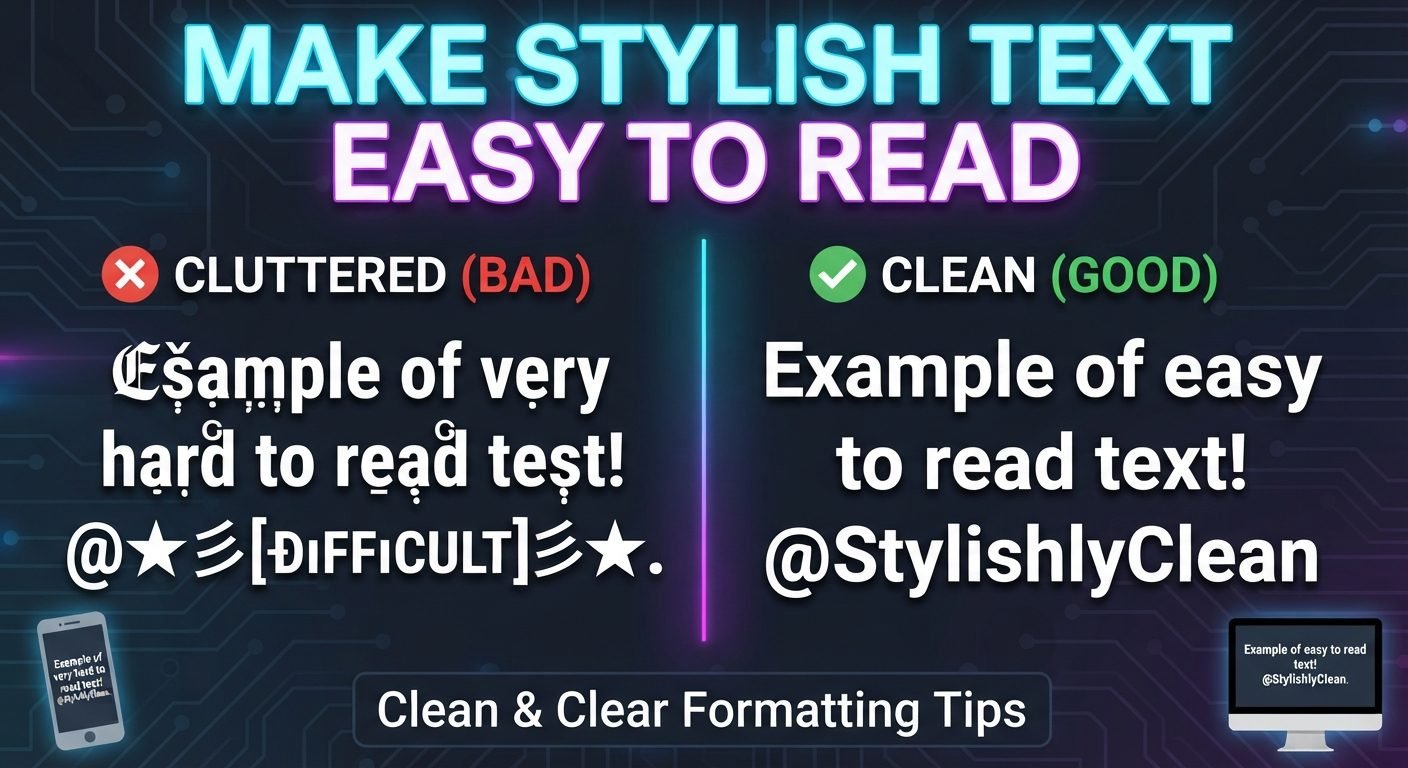
If you are using a generator for a social media name, start with readability.
A useful process is:
1. Write the normal version
Nova Creates
2. Generate several styles
Look at bold, script, serif-like, monospace, decorative, and other available options.
3. Remove styles that are difficult to read
A style may look impressive but become unclear at small sizes.
4. Check the actual platform
Paste the result into the exact profile field where you plan to use it.
5. Test on another device
Check whether it remains readable.
6. Keep a plain-text version
Always remember the original spelling.
This gives you a backup if the styled version is rejected or displayed incorrectly.
How Stylish Text Generators Are Different From Image Generators
A stylish text generator produces characters that can usually be copied as text.
An image generator produces a picture.
For example, if you create:
𝐍𝐨𝐯𝐚
using Unicode characters, you may be able to copy and paste it into another text field.
If you create an image containing the word “Nova” in a decorative typeface, the word is part of the image instead.
This distinction matters.
Unicode styling is useful when you need selectable and copyable text. Images are useful when you need complete control over visual appearance.
Why There Is No Universal Stylish Text
There is no single “Unicode font” that guarantees the same appearance everywhere.
The Unicode characters may be standardized, but the glyphs used to display them are controlled by fonts and rendering systems.
Therefore, two devices can receive exactly the same Unicode text and render it somewhat differently.
This is not a failure of Unicode. It is a consequence of the separation between character encoding and visual rendering.
A Simple Way to Think About It
Imagine Unicode as a catalog of characters.
A font is the visual design used to draw those characters.
A stylish text generator is often like a translator that takes ordinary characters and substitutes them with other Unicode characters that have a particular visual appearance.
So:
Unicode: identifies characters.
Font: determines how characters look.
Stylish text generator: often converts ordinary characters into alternative Unicode characters.
Social platform: decides which characters it accepts and how they are rendered.
That four-part relationship explains most of what happens when you paste fancy text online.
Practical Tips for Using Stylish Text
For the best results:
- Keep important names recognizable.
- Test the generated text on the platform where you will use it.
- Avoid extremely complicated character combinations.
- Keep a plain-text backup.
- Do not assume every platform accepts Unicode equally.
- Avoid relying on obscure characters for important information.
- Check how the text looks on mobile and desktop.
- Remember that a stylish display name may not be suitable as a username.
- Use decoration to improve readability or identity rather than obscure the words.
- Consider accessibility before using unusual characters extensively.
Read also: → Fancy Text Generator — Stylish Unicode Fonts Free
Frequently Asked Questions
Are Unicode fonts real fonts?
No. A font is a file your device installs, while these are separate characters that already exist in the Unicode standard and happen to look styled. That difference is why the look survives a copy and paste.
Why do I not have to install anything?
Because nothing is being installed. The generator swaps your letters for different characters, and your device draws them with fonts it already has — which is also why the result can look different elsewhere.
Why does stylish text sometimes show as empty boxes?
The device has no glyph for that character. The text is intact and will display correctly for anyone whose device covers that part of Unicode, but on that screen there is nothing to draw.
Why is stylish text hard to search for?
A styled letter is a different character from the ordinary one, so a search for the plain spelling does not match it unless the platform normalises text first. Many do not.
What is the difference between Unicode and ASCII?
ASCII covers a small set of mostly English characters; Unicode assigns a code point to characters across effectively every writing system, which is where the styled alphabets come from.
Conclusion
Unicode is the foundation that allows computers to represent an enormous range of characters and writing systems consistently. It is not a font, and it does not define exactly how characters should look.
Fonts and rendering systems determine the visual appearance of Unicode characters.
Stylish text generators take advantage of this distinction. Instead of installing a new font or changing the formatting of ordinary text, many generators replace normal characters with alternative Unicode characters that produce a visually different result when displayed.
That approach is clever and useful, especially for social media names, bios, gaming profiles, and decorative text. But it also has limitations. Different platforms have different character rules, devices may render characters differently, and highly unusual text can become difficult to search, copy, or read.
The best stylish text is therefore not necessarily the most complicated. A strong result combines recognizable words with a visual style that the target platform can reliably display. Understanding what is actually happening underneath the design makes it much easier to choose stylish text that looks good without sacrificing usability.