A stylish name for WhatsApp profile display is simply your profile name written with cleaner wording, Unicode letters, or a small symbol — nothing more technical than that. WhatsApp limits the profile name to 25 characters and lets you add emoji, so the whole craft is fitting personality into a very small space.
That small space does a lot of work. Your profile name sits in group chats, in call screens, and next to every message you send to someone who has not saved your number. It is the one line of self-expression WhatsApp gives you that is not a photo. Unlike a bio on a public network, it is read almost entirely by people you actually know.
This guide collects 605 profile name ideas across ten moods: stylish, cool, cute, aesthetic, fancy, girls, boys, short, symbol-and-emoji, and unique. Every one is short enough to work as a stylish name for WhatsApp profile display without breaking the 25-character limit. Below the lists you will find how to pick one that still reads like you, plus the current steps for changing it. There is also a short comparison with the separate WhatsApp username feature, which follows completely different rules.
What Is a Stylish Name for WhatsApp Profile Display?
A stylish name for WhatsApp profile use is any profile name chosen for tone rather than pure identification. It can be a real name with one symbol beside it, a two-word phrase that captures a mood, a single uncommon word, or the same name set in a decorative Unicode alphabet. What makes it stylish is restraint and fit, not decoration volume.
Three things are worth knowing before you pick one. The profile name is capped at 25 characters, and emoji are supported directly in the field. The third point surprises people: contacts who already saved your number keep seeing the name in their own address book. WhatsApp's Help Center puts it plainly: your profile name is visible to people in groups who have not saved your contact information. So a new name reaches new contacts and group members first, not your existing chats.
Where Your Profile Name Shows Up — and Where It Doesn't
This is the part most name guides skip, and it changes which name is actually worth choosing. WhatsApp's Help Center is explicit that your profile name is visible to people in groups who have not saved your contact information. Anyone who already has your number in their address book keeps seeing the name they saved for you, not the one you set.
The consequence is practical. A stylish name for WhatsApp profile display is read mostly by two audiences: group members you are not personally saved by, and new contacts messaging you for the first time. Your closest friends — the people whose opinion you were probably imagining — may never see it at all unless they delete your contact entry.
That should make you braver, not more cautious. The name is not a permanent public label, and changing it costs nothing. But it also means the name has a real job in group chats: being identifiable to people who know you loosely. In a work group or a building group, an entirely abstract name reads as anonymous, which is the one effect you almost never want.
It is also worth remembering that chat lists, notification banners, and call screens all give a name less room than the settings field does. A name that fits the 25-character limit exactly can still arrive truncated on a smaller screen, which is the strongest practical argument for staying well under the cap.
Best Stylish Names for WhatsApp Profile
These are the all-rounders: names that read well in a crowded chat list, work for any age, and do not lock you into one mood. Most are two-word phrases built from concrete nouns rather than adjectives. That is why they stay legible at small sizes and in notification previews. If you want one good stylish name for WhatsApp profile use and do not want to think about it further, start here.
A quick tip on choosing from this list: read the name out loud once. If it sounds like something you would actually say, it will age well. If it sounds like a brand you invented, it usually wears out within a month.
Select any name in the following list to copy it.
Cool WhatsApp Profile Names
Cool here means composure rather than volume. The names below lean on confidence, minimalism, and a bit of mystery — the tone of someone who does not need the chat list to notice them. A few are gaming-adjacent in feel, but none are lifted from a game roster. They will not read as a username that wandered into the wrong app.
Pair one of these with a plain profile photo and the effect lands harder than any amount of symbol decoration. Understatement is the whole point of the category.
Select any name in the following list to copy it.
Cute WhatsApp Profile Names
Soft, warm, and slightly silly — this set is built for family groups, close friends, and anyone who would rather be approachable than impressive. The names lean on food, small animals, weather, and comfort objects. That is why they feel friendly without tipping into baby talk.
These are also the safest names to use with relatives. A cute profile name is legible to every generation in a family group, where a heavily styled one often is not.
Select any name in the following list to copy it.
Aesthetic WhatsApp Profile Names
Aesthetic names trade cleverness for atmosphere. Most of the entries below are written in lowercase on purpose. That visual softness is half of the effect, and WhatsApp preserves your capitalisation exactly as you type it. The set covers four moods: dreamy and soft, dark and moody, elegant and minimal, and nature-led.
If you like this look, keep the rest of your profile quiet too. An aesthetic name works best against a muted photo and a short About line rather than competing with them.
Select any name in the following list to copy it.
Fancy WhatsApp Profile Names
Fancy names use decorative Unicode alphabets — script, bold script, sans-serif bold, blackletter, monospace, double-struck, and small capitals — rather than a font WhatsApp installs. That is why they paste in and stay styled. They are ordinary characters that happen to be shaped differently, not formatting. A styled alphabet is the most literal way to build a stylish name for WhatsApp profile use. Each name below uses exactly one alphabet, with a light accent mark on some. Mixing three styles into a single name is what makes a fancy name look like spam.
To style your own name rather than copying one of these, run it through the font generator or the fancy text generator and paste the result into the name field. The same styled alphabets work elsewhere too, so if you want a matching look across apps, see our roundup of fancy text styles for social media. Two practical cautions. A very old device may show unfamiliar styled letters as empty boxes. A styled name can also hit the 25-character limit sooner than a plain one; if WhatsApp stops accepting characters, shorten the base word instead of dropping letters mid-name.
Select any name in the following list to copy it.
WhatsApp Profile Names for Girls
These are not first names with a decorative word bolted on. Each entry is its own idea: a flower, a texture, a small contradiction, an inside joke about being both soft and unbothered. The list does not read as one template repeated sixty times. Several deliberately undercut themselves, because a name that is entirely sweet gets boring faster than one with a little edge.
Select any name in the following list to copy it.
WhatsApp Profile Names for Boys
Same principle in a different register: landscape, craft, weather, and old-fashioned trades, rather than a first name plus a power word. The set skews grounded and a bit rugged without reaching for aggression. Aggression tends to translate badly in a family group or a work chat.
Select any name in the following list to copy it.
Short WhatsApp Profile Names
Short names are the most underrated option on WhatsApp. The chat list truncates long names, and notifications truncate them further. A lock-screen preview can cut a long name in half. A name of four to ten characters is the only one guaranteed to appear in full everywhere. The shortest stylish name for WhatsApp profile use is very often the strongest, and every entry below sits comfortably inside the 25-character limit with room to spare for an emoji if you want one.
If you want a short name that also looks different, small-capital styling keeps the letter count identical while changing the shape. The small text generator produces it. The list mixes uncommon single words with two-word pairs that stay compact. Both hold up well next to a profile photo, which is the real test.
Select any name in the following list to copy it.
WhatsApp Profile Names With Symbols & Emoji
WhatsApp supports emoji directly in the profile name field — the Help Center documents an emoji button right in the name editor on Android and on Web. Typographic symbols such as ✦, ☾, and ❀ are ordinary Unicode characters, so they paste in the same way.
The names below each use one symbol or emoji, never a matching pair wrapped around the name. The symbol also changes from entry to entry, rather than the same star being attached to fifty names. One well-chosen symbol is usually all it takes to turn a plain word into a stylish name for WhatsApp profile display; that is the difference between a decorated name and a cluttered one. For more characters to work with, browse the symbols library or the emoji collection. Blank-looking characters are a different matter — if that is what you are after, read how invisible text actually behaves before relying on it.
Select any name in the following list to copy it.
Unique WhatsApp Profile Names
This last set is for people who would rather be memorable than pretty. Most entries are small jokes, half-confessions, or status lines pretending to be names — the kind of thing that makes someone pause for a second in a group chat. An unusual stylish name for WhatsApp profile display buys you a second of attention in a list of ordinary ones. These are original combinations rather than common phrases, though profile names are not unique identifiers, so nothing stops two people choosing the same one.
Select any name in the following list to copy it.
How to Choose a Stylish WhatsApp Profile Name
Picking a stylish name for WhatsApp profile use comes down to one question: who reads it? On a public network you are competing for strangers' attention. On WhatsApp you are mostly reassuring people who already know you. That flips most naming advice on its head.
- Pick a personality first, not a name. Decide whether you want to read as warm, composed, funny, or quiet — then choose from that section only. Browsing all ten lists at once is how people end up with a name that does not sound like them.
- Keep it readable at a glance. Your name is scanned, not read. If it takes more than a second to parse in a chat list, it is too decorated.
- Use one symbol at most. A single emoji or typographic mark reads as intentional. Three read as an accident.
- Respect the 25-character limit. Aim well under it. Names that fit exactly still get truncated in notifications and previews on smaller screens.
- Stay recognisable. If a relative or a client has to guess who is messaging them, the name has failed at its only functional job.
- Match the context. A name that is perfect for a friends' group can read as careless on a WhatsApp Business profile, where the name is often a customer's first impression.
- Avoid anything misleading or offensive. Impersonating someone else or using slurs risks your account, and it is not stylish in any case.
One more test that catches most bad choices: imagine the name appearing above a serious message — a condolence, a job enquiry, a hospital update. If it would be embarrassing there, pick something else. Profile names travel into contexts you do not choose. In the end, the best stylish name for WhatsApp profile use is the one you stop noticing after a week — it should feel like your name, not like a costume you are still wearing.
Read also: → WhatsApp Name Generator — build a styled name from your own
How to Change Your WhatsApp Profile Name
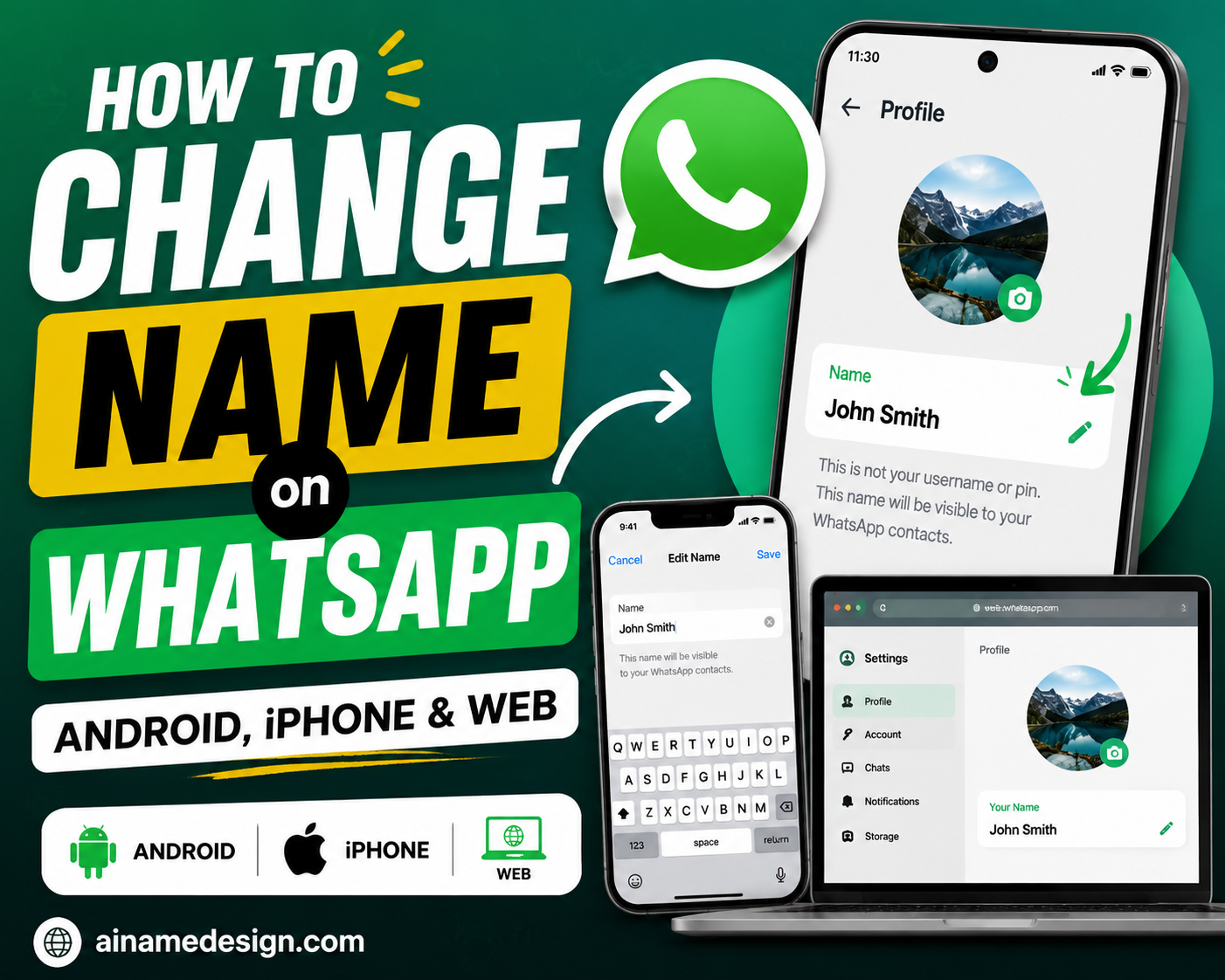
Changing the profile name takes about fifteen seconds, and WhatsApp does not limit how often you can do it. The exact wording of the menus differs a little between Android, iPhone, and desktop, and between app versions. Treat the labels below as the current shape rather than a fixed script. These steps follow WhatsApp's own Help Center article on editing your profile.
On Android
- Tap the menu button, then tap Settings.
- Tap your profile picture, then tap Name.
- Enter your new name. The limit is 25 characters.
- To add emoji, tap the emoji button in the name field.
- Tap Save.
On iPhone
- Tap your profile picture twice, then tap your name.
- Enter your new name. The limit is 25 characters.
- Tap Save.
On WhatsApp Web and Desktop
- Click your profile photo, then click Profile.
- Click the edit control beside your name and enter your new name.
- Add emoji from the emoji button if you want one. The limit is 25 characters.
- Confirm to save the change.
If you are pasting a styled or symbol-decorated name, copy it from this page and paste it straight into the field. Retyping will not work, because decorative Unicode letters are not on a standard keyboard. And if the field stops accepting characters before your name is finished, you have hit the 25-character ceiling; shorten the base word rather than deleting the ending.
WhatsApp Profile Name vs WhatsApp Username
These are two different features and they are easy to confuse. The profile name is the display name everyone has always had. The username is a newer, optional identifier — rolling out gradually and not yet available everywhere — that lets people contact you without knowing your phone number. Picking a stylish profile name has nothing to do with reserving a username. The rules do not overlap, much as a display name and a handle stay separate on the other platforms in our social media name hub.
| Feature | Profile name | Username |
|---|---|---|
| Purpose | Shows who you are | Lets people reach you without your phone number |
| Visibility | Seen by group members and anyone who has not saved your number | Shown with an @ to people who do not have your number saved |
| Character limit | 25 characters | Between 3 and 35 characters |
| Uniqueness | Does not have to be unique — anyone can use the same one | Must be unique to your account |
| Symbols | Emoji and Unicode symbols work | Latin characters, numbers, periods, and underscores |
| Phone number | Does not change who can see your number | Keeps your number private from people who do not already have it |
WhatsApp's username FAQ sets those character rules: three to 35 characters, using latin characters, numbers, periods, and underscores. The short version: style belongs in the profile name, where emoji and decorative letters are allowed and nothing has to be unique. The username is a plain-text address, closer to an email handle than to a piece of self-expression.
Read also: → How to Change Name on WhatsApp: Android, iPhone & Web
Frequently Asked Questions
What is a stylish name for WhatsApp profile use?
It is a WhatsApp profile name chosen for tone rather than plain identification — a mood phrase, an uncommon single word, a name with one symbol beside it, or the same name set in a decorative Unicode alphabet. It still has to fit WhatsApp's 25-character profile name limit and stay readable in a crowded chat list.
How many characters can a WhatsApp profile name have?
Twenty-five. WhatsApp's Help Center states the profile name limit is 25 characters on Android, iPhone, and Web. Aim shorter than that in practice, because notifications and lock-screen previews truncate long names before the limit is even reached.
Can I use emoji in my WhatsApp profile name?
Yes. WhatsApp's own instructions for editing your profile include an emoji button in the name field, so emoji are supported directly. One emoji generally looks intentional; three or more usually looks cluttered, and each one counts toward your 25 characters.
Can I use special characters and fancy fonts in my WhatsApp name?
Yes, with one caveat. Decorative script, blackletter, and small-capital letters are ordinary Unicode characters rather than fonts, so they paste into the name field and stay styled. Very old devices without those characters in their system font may show empty boxes instead, so test the name once before keeping it.
How do I change my WhatsApp profile name?
Open Settings, tap or click your profile photo, then edit the name field and save. On Android the field is labelled Name; on iPhone you tap your profile picture twice and then your name; on Web you open Profile and use the edit control beside your name. Menu labels shift slightly between versions.
What is the difference between a WhatsApp profile name and a WhatsApp username?
The profile name is your display name — up to 25 characters, emoji allowed, and it does not have to be unique. The username is a separate optional feature, still rolling out gradually, that lets people message you without your phone number. Usernames are unique, run from 3 to 35 characters, and accept only latin characters, numbers, periods, and underscores.
Will my contacts see my new stylish name?
Not the ones who already saved your number. WhatsApp shows the name saved in each person's own address book, so a rename reaches group members and people who have not saved you, while existing contacts keep seeing whatever they saved you as.
Should my WhatsApp profile name be my real name?
It does not have to be, but it should be recognisable. WhatsApp is a contacts app rather than a public network, so a name that leaves relatives, clients, or classmates guessing creates friction. A stylised version of your real name is usually the best compromise.
Can I make my WhatsApp profile name invisible?
Not reliably. Blank-looking characters sometimes pass validation and sometimes do not, behaviour changes between app versions, and an empty name makes you unidentifiable to everyone who has not saved your number. If you want to experiment with blank characters and understand what they actually are, read our guide to <a href="/blog/how-to-make-and-use-invisible-text/">invisible text</a> first.
Do stylish names work on WhatsApp Business too?
Technically yes — the business profile name accepts the same characters. Whether it is a good idea is another question. A business name is often a customer's first impression, so consistency with your storefront or <a href="/social-media/">social profiles</a> usually matters more than decoration.