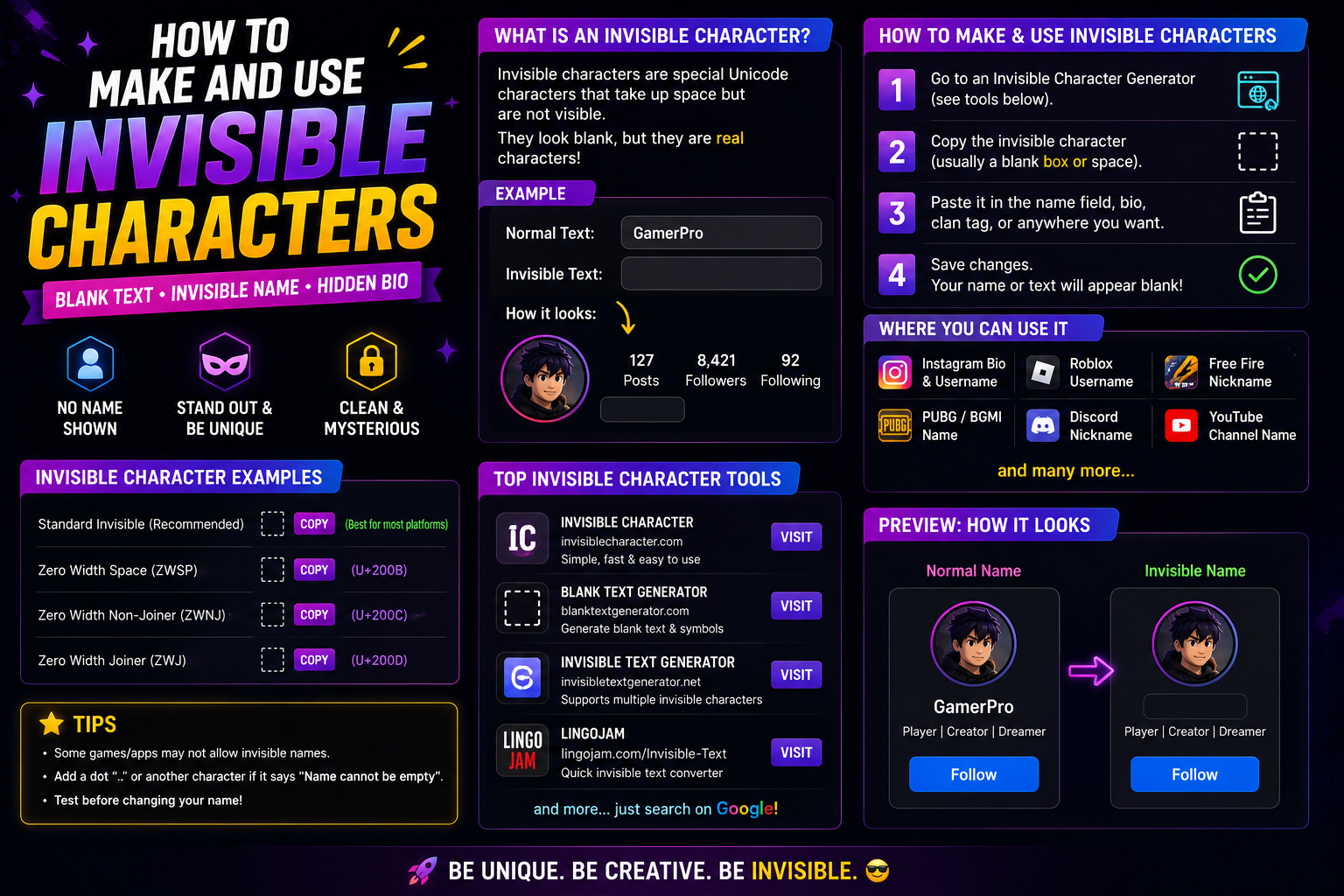
Invisible text is text made from Unicode characters that draw nothing on screen. The characters are genuinely there — they occupy positions, count toward length limits, and travel with the text when copied — but they render as empty space, which is what makes them useful in a field that will not accept a blank value.
That distinction is the whole trick, and it is also where most confusion starts. An empty field contains no characters at all, so a form can detect it and reject it. A field holding an invisible character contains a character, passes the check, and still looks blank. People use that to leave a display name apparently empty, to push a line of a bio down the page, or to create spacing where a normal space would be trimmed away.
If you came here to learn how to type an invisible character, the short answer is that you do not type one — there is no key for it. You copy one that already exists and paste it.
What Is Invisible Text?
Ordinary text is a sequence of characters your device knows how to draw. Invisible text is the same thing with one difference: the characters chosen have no visible shape. Some were designed that way for typesetting, others for controlling how neighbouring characters join together, and a couple are simply blanks that happen to exist in scripts that needed them.
None of them are a font effect, and none of them are a trick of formatting. Change the font and an invisible character stays invisible, because there is nothing to draw in the first place. That is why they survive copying between applications intact while a bold style applied in a word processor does not.
The practical consequence is that apps disagree about them. A character that Unicode classifies as a formatting code is treated very differently from one classified as a letter, even though both look like nothing on screen. One platform may store both without comment; another may quietly delete the first and keep the second. Nothing about their appearance predicts which will happen.
How Does Invisible Text Work?
Every character in Unicode carries properties beyond its shape — a category, a width, rules about how it interacts with what sits beside it. Invisible characters differ from each other in exactly those properties, and that is why they behave inconsistently.
Broadly, three kinds turn up in practice. Zero-width characters take up no horizontal room at all; they were encoded to control joining and line-breaking behaviour rather than to create space. Blank characters of fixed width are spaces in the typographic sense — an en space, an em space, a thin space — each a defined size, all of them drawing nothing. They sit alongside the zero-width codes in Unicode's General Punctuation chart, which is where the official names come from. And a small number of blank characters classified as letters or symbols exist because a writing system needed a placeholder; those behave least like whitespace and are often the ones that survive where the others do not.
It is worth being precise here, because the terms get used interchangeably and they are not the same. Not every invisible character is zero-width, and not every zero-width character is a space. Knowing which category a character belongs to tells you more about how it will behave than anything you can observe by looking at it.
How to Create Invisible Text
Every method comes down to obtaining the character from somewhere and moving it into the field you want.
- Open the invisible character tool and pick a character — the label beside each one tells you which category it belongs to.
- Tap it to copy. Nothing will appear to happen, because there is nothing to see; the character is on your clipboard regardless.
- Paste it into the field you are targeting.
- Save, then reload the page and look again. This step is not optional — plenty of platforms accept the paste and strip the character at save time.
For anything practical, copying is the method — what each system actually offers is covered below.
If what you actually want is decorative rather than blank — a name that stands out rather than one that disappears — invisible characters are the wrong tool. Styled Unicode letters are covered in the guide to fancy text styles, and the symbols library holds the visible decorative characters people often reach for by mistake when what they wanted was a blank.
How to Copy Invisible Text
Copying works exactly as it does for visible text, with one complication: you cannot see what you have selected, so it is easy to grab nothing, or to grab too much.
Use a copy button where one exists rather than dragging a selection by hand. The tool page provides one for each character, which removes the guesswork entirely. If you are copying from somewhere without a button, select from a visible character on one side to a visible character on the other, then delete the visible parts after pasting — clumsy, but reliable.
To confirm you actually have something, paste into a field with a character counter and watch whether the count moves. If it does, the character is real and on your clipboard.
- Copy the character with a copy button rather than a hand-made selection.
- Paste it somewhere harmless and type a visible character on each side of it.
- Paste into the real field, save, then reload the page from scratch.
- Look again. Editing can accept a character that saving quietly removes.
How to Type an Invisible Character
Typing is the wrong verb. A keyboard sends what is printed on its keys, and none of that is blank here — the space bar gives an ordinary space, which most systems trim. These characters have no key at all.
Some systems offer a Unicode input method that enters a character by its code point. It works, but it is slower than pasting and inconsistent between applications. Copying from the invisible character tool stays the practical answer; below is what each system gives you.
How to Type Invisible Characters on Windows, Mac, Android and iPhone
Windows
Windows can enter characters by hexadecimal code, but that route relies on a setting that is off by default and ignored by many applications. The emoji panel will not help either: a zero-width character has no preview to show.
macOS
macOS has a Unicode Hex Input keyboard source that enters a character from its code point, plus the Emoji & Symbols viewer. Both are real input methods, and both are awkward for something that displays as nothing.
Android
Android has no system-level code-point entry, and third-party keyboards rarely include blank characters. Long-press the copy control, then long-press the field and paste.
iPhone and iPad
iOS and iPadOS are the same: no code-point entry, no blank key. Copy, then tap and hold in the field and paste. Because a successful paste can look like nothing happened, trust the character count rather than the field.
Where Can You Use Invisible Text?
The honest answer is that it depends on the field, not the platform, and the only way to know is to test the specific field you care about. That said, some uses are far more reliable than others.
- Spacing inside a bio. The most dependable use. A blank character between two lines of text creates separation that a platform will not trim, because it is not at the start or end of the field.
- Apparently empty display names. Works on some services and not others, and tends to change without notice.
- Messages and chat. Generally accepted, since message bodies are rarely validated as strictly as profile fields.
- Formatting alignment. Fixed-width blanks are genuinely useful for lining up short pieces of text where you cannot use real layout.
- Testing how a system handles input. A legitimate developer use — invisible characters are a quick way to check whether a form normalises or sanitises what it receives.
Bios and about sections are usually the most permissive part of a profile, which is why they are where this works most often. The social media hub covers which field does what across the major platforms, and the Instagram bio guide goes through one platform's fields in detail.
Naming platforms individually is less useful than it sounds: each app has several fields with different rules, and those rules change. Roughly, message bodies on WhatsApp and Discord tend to be permissive, Instagram and TikTok bios often keep a character mid-line but trim one at the edges, and Facebook is stricter with name fields than post text. Test rather than assume.
Invisible Text for Usernames and Display Names
This is the use people ask about most, and the one with the least reliable outcome.
Usernames and handles are identifiers. Systems use them for lookup, for mentions, for URLs, and for telling two accounts apart — so they are validated far more strictly than anything else on a profile. Many services restrict them to a fixed set of characters outright, in which case no invisible character will pass, whatever category it belongs to. Display names are looser almost everywhere, which is why a blank-looking name is usually a display name rather than a handle.
Three things to expect. Character limits still apply, because an invisible character occupies a position like any other — a name that looks empty may still be at its maximum length. Validation rules change between updates, so a method that worked previously may simply stop. And some platforms specifically prevent blank display names, having decided that an unnamed account is a problem rather than a feature.
Game platforms deserve separate mention because their rules are stricter again and differ from one title to the next. Making an invisible name in Free Fire covers that game's specifics, and the Roblox username guide explains why that platform's handles reject non-standard characters entirely while its display names are more permissive. Where a game allows decorative characters at all, they tend to be visible symbols rather than blanks, which the gaming symbols guide covers.
One consequence catches people out repeatedly: an invisible character is not a way around a length limit. Because it occupies a position, a bio padded with blanks for spacing has less room left for words than it appears to. If a field starts refusing input while looking half empty, count the blanks before assuming the limit is wrong.
Read also: → Roblox Display Names — how display names and usernames differ in practice
Invisible Text vs Invisible Space vs Zero-Width Characters
These three phrases get used as synonyms and describe overlapping but different things. Sorting them out makes the rest of the subject easier to reason about.
| Term | What it actually refers to | Width | Practical note |
|---|---|---|---|
| Invisible text | The umbrella term — any text built from characters that draw nothing | Varies | Describes the effect, not a specific character |
| Invisible space | A blank character with a defined typographic width | Fixed and real | Behaves like whitespace, so it is often trimmed at field edges |
| Zero-width character | A formatting code that occupies no horizontal room | None | Most likely of the three to be deliberately stripped |
The useful takeaway is that "invisible space" and "zero-width character" are not interchangeable, and choosing between them changes your odds. A space-class character has real width and reads as whitespace to software that trims input. A zero-width one has no width but belongs to the category platforms most often filter on purpose. When one fails, the productive move is to switch to a character from a different category rather than trying another character from the same one.
Common Invisible Unicode Characters
These are the characters people actually reach for. The category column is the Unicode General Category, the property software keys on when deciding what to remove.
| Official Unicode name | Code point | Category | What it actually does |
|---|---|---|---|
| Zero Width Space | U+200B | Format (Cf) | No width. Not a space to software, so it is stripped rather than trimmed. |
| Zero Width Non-Joiner | U+200C | Format (Cf) | Stops two characters joining. For cursive scripts, not for gaps. |
| Zero Width Joiner | U+200D | Format (Cf) | Requests joining; binds multi-part emoji. Can alter neighbouring glyphs. |
| Word Joiner | U+2060 | Format (Cf) | No width; prevents a line break there. The current character for that job. |
| Zero Width No-Break Space | U+FEFF | Format (Cf) | Historically the no-break character; now chiefly the byte order mark. |
| Hangul Filler | U+3164 | Letter, Other (Lo) | A letter, so it passes some validators that reject format characters. |
| Braille Pattern Blank | U+2800 | Symbol, Other (So) | A symbol with real width that renders blank in most fonts. |
| No-Break Space | U+00A0 | Space Separator (Zs) | A real space with width that will not break. Trimmed at field edges. |
Two things follow. The joiner and non-joiner are not spacers; they control how neighbouring characters connect, so padding with them can alter how text renders. And category predicts behaviour better than a name does — if one fails, switch category rather than its neighbour.
Why Invisible Text Sometimes Does Not Work
Failures look identical from the outside — you paste something, save, and it is gone — but the causes are distinct, and knowing which you are facing saves a lot of trial and error.
- Deliberate filtering. Some platforms strip formatting-category characters as policy, usually to stop blank names. Nothing you do with a character from that category will get through.
- Whitespace trimming. Most systems remove leading and trailing whitespace before storing a value. A space-class character at either edge disappears; the same character between two visible characters survives.
- Normalisation. Some services convert input to a standard form before saving, which can collapse or replace certain characters as a side effect rather than a decision.
- Length limits. The character counts toward the limit even though it shows nothing, so a field that is already full will reject it.
- Editor and rendering differences. Text editors, form fields and messaging clients handle these inconsistently. A character may be intact in storage and simply not survive a particular editing surface.
Two habits make diagnosis quicker. Test in the exact field you intend to use rather than a similar one, because validation is per-field. And change one variable at a time — a different character, or a different position within the field — instead of changing both at once and learning nothing from the result.
It is also worth accepting when a field is simply closed. If several characters from different categories all vanish, the field is validating strictly, and no invisible character is going to pass.
Why Does My Invisible Character Show as a Box?
Sometimes the character does not vanish — it shows as a narrow rectangle, sometimes with small digits inside. That is the renderer saying the font has no glyph for that code point. It is a display result, not proof the wrong character was pasted: the same text can look blank in one app and boxed in another. If a box would matter, test in the app your readers use.
Is Invisible Text Safe to Use?
The characters themselves are ordinary parts of the Unicode standard. They are not malware, they carry no payload, and pasting one into your own bio does nothing to your account or your device. Using them for spacing or for a blank display name is unremarkable.
The reasonable caution is about intent rather than the characters. Because they are unreadable, invisible characters can be used to break up a word so that a simple text filter no longer matches it, to make two different strings look identical, or to conceal content inside text that appears innocuous. Those uses are why platforms strip them in the first place, and why the filtering tends to get stricter over time rather than looser.
The line is not difficult to see. Spacing out a profile, creating a blank display name where a service permits it, or aligning text is normal use. Imitating another person's handle, evading a moderation system, or hiding content from someone who is meant to read it is not, and can cost you the account regardless of how the characters are classified.
One small practical point that has nothing to do with abuse: invisible characters are invisible to people using screen readers too, but the software still encounters them. Depending on the tool, they may be announced or silently skipped. If you are using them purely for spacing that is harmless; if you are relying on them to carry any meaning, that meaning will not reach everyone.
Frequently Asked Questions
How do I make invisible text?
You copy an existing invisible character rather than typing one, because no keyboard key produces them. Pick a character from the invisible character tool, copy it, and paste it into the field you want.
How do I type an invisible character?
You do not, in the usual sense — no key on a standard keyboard produces one. Some desktop systems can enter a character from its code point, but that is slower than pasting and behaves differently between applications. The practical method is to copy a character from a source that offers a copy button, then paste it into the field you want.
Can I type an invisible character on iPhone or Android?
Neither iOS nor Android offers a built-in way to enter a character by its code point, so copying is the method on both. Copy from a page with a copy button, then tap and hold in the destination field and choose Paste. Because a successful paste can look like nothing happened, check the character count rather than the field itself.
How do I copy an invisible character?
Use a copy button where one is offered, since you cannot see what you are selecting by hand. To confirm the copy worked, paste into a field with a character counter and check that the count increases.
What is an invisible space?
A blank character with a defined typographic width, such as an en space or a thin space. It differs from a zero-width character, which occupies no horizontal room at all and belongs to a different Unicode category.
Can I use invisible characters in a username?
Sometimes, but usernames are the least reliable place for them. Handles are identifiers and are validated strictly, so many services restrict them to a fixed character set. Display names are usually more permissive than usernames on the same platform.
Why does my invisible character disappear when I save?
Usually because the platform stripped it or trimmed it. Formatting-category characters are often removed on purpose, and whitespace is commonly trimmed from the start and end of a field. Trying a character from a different category, or placing it between two visible characters, often works.
Why does my invisible character show up as a box?
Because the font in use has no glyph for that code point, so the renderer draws a placeholder rectangle instead of nothing. That is a display outcome rather than a sign the wrong character was pasted — the same text can still appear blank in a different app on the same device.
Are invisible characters the same as spaces?
Not quite. An ordinary space is one specific character, while invisible characters are a group that includes several space-like characters plus zero-width codes and blank placeholders classified as letters or symbols. Software treats those groups differently.
Does invisible text work everywhere?
No, and support varies by field rather than by platform. Bios and messages tend to accept them; usernames and strictly validated forms often do not. Behaviour also changes between platform updates, so testing in the field you intend to use is the only reliable check.