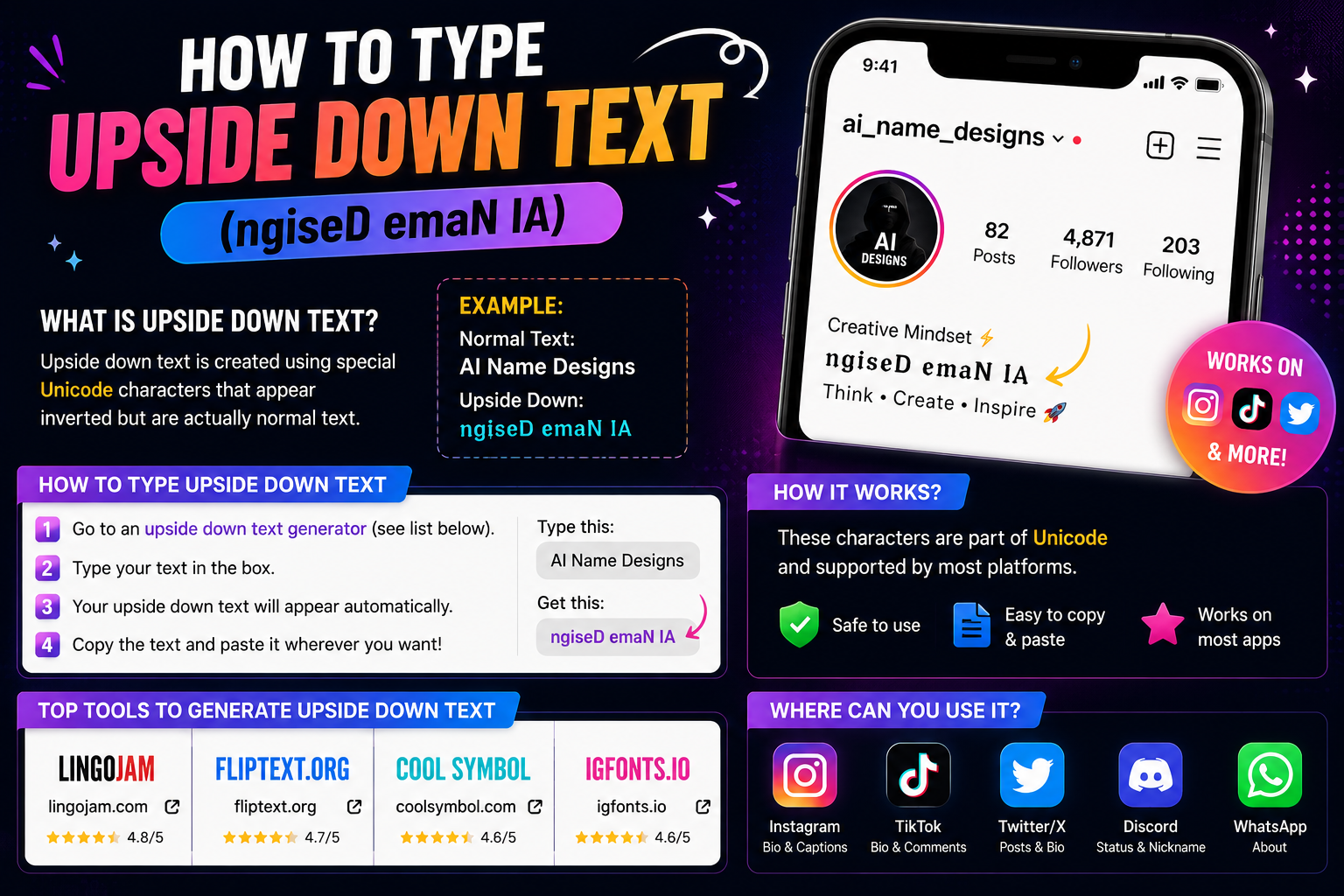
Upside down text is ordinary text rebuilt from Unicode characters that happen to look like rotated letters, then written back to front. Knowing how to type upside down text is really knowing those two steps — nothing is rotated, the shapes are chosen rather than spun.
This guide covers how to type upside down text from both directions: the quick way using a reference table, and the manual way, character by character, so you understand what is actually happening and can fix it when a letter refuses to cooperate.
What Is Upside Down Text?
Upside down text looks like this: uʍop ǝpᴉsdn sᴉ ǝɔuǝʇuǝs sᴉɥʇ.
Read it right to left and the words appear the right way up. That is the whole illusion. Your device is not rendering anything at an angle, and no image is involved — every one of those shapes is a normal text character that can be copied, pasted, and stored like any other.
The characters mostly come from the International Phonetic Alphabet, where linguists needed symbols for sounds that ordinary Latin letters did not cover. Several of those symbols happen to be existing letters drawn upside down, and Unicode named them accordingly. You can check that yourself in the official IPA Extensions code chart, where ɐ is listed as Latin Small Letter Turned A and ʇ as Latin Small Letter Turned T. Upside-down text borrows them for a purpose their designers never had in mind.
How Does Upside Down Text Work?
Two separate operations, applied in order. Miss either one and the effect does not appear.
- Substitution. Each character is swapped for a different character that resembles its rotated form — a becomes ɐ, e becomes ǝ, t becomes ʇ.
- Reversal. The whole sequence is then written in reverse order, because a genuinely rotated line would start where the original ended.
Take the word hello. Substituting gives ɥǝןןo — recognisable, but still reading left to right. Reversing that gives oןןǝɥ, which is the finished result. Skipping the reversal is the single most common reason home-made attempts look wrong.
The substitutions themselves are not one consistent set. Fifteen letters map to real turned characters. Six are simply other ordinary letters reused because their shape already works: b and q stand in for each other, as do d and p, and n and u. Four letters — o, s, x and z — are close enough to symmetrical that they are left alone. And one, l, has no Latin option at all.
How to Type Upside Down Text
There is no keyboard shortcut and no built-in operating-system setting, so how to type upside down text always comes down to the same thing: getting the substituted characters from somewhere, then pasting them where you want them.
- Write your text out normally first, in lowercase.
- Replace each character using the reference table in the next section.
- Reverse the order of everything you just produced.
- Read it back to check that no character was skipped.
- Select the finished string and copy it.
- Paste it into the field where you want it, and preview before saving.
For short phrases this takes under a minute. If you would rather start from something ready-made, these are already flipped and can be copied directly:
Select any name in the following list to copy it.
How to Make Upside Down Text Manually
The full lowercase reference, and the core of how to type upside down text by hand. Uppercase is deliberately absent: Unicode has no turned forms for capital letters apart from a single turned A, which is why upside-down text is written in lowercase.
| Normal | Upside down | Normal | Upside down |
|---|---|---|---|
| a | ɐ | n | u |
| b | q | o | o |
| c | ɔ | p | d |
| d | p | q | b |
| e | ǝ | r | ɹ |
| f | ɟ | s | s |
| g | ƃ | t | ʇ |
| h | ɥ | u | n |
| i | ᴉ | v | ʌ |
| j | ɾ | w | ʍ |
| k | ʞ | x | x |
| l | ן | y | ʎ |
| m | ɯ | z | z |
Three caveats keep this from being a complete alphabet, and they matter more than the table suggests.
- Some of these are not turned letters at all. The substitutes for b, d, n, p, q and u are just ordinary letters that happen to look right. That is a visual coincidence, not a designed relationship.
- The letter l is the weak point. The character normally used for it, ן, is a Hebrew letter. It is classified right-to-left in Unicode, so mixing it into Latin text can occasionally reorder the characters around it in ways you did not intend.
- Digits are borrowed from further afield still. The stand-ins for 2 and 5 come from Korean and Greek respectively, and are the most likely characters in the whole set to be missing from a given device's fonts.
Accented characters, other alphabets and most punctuation have no equivalent in this scheme and pass through unchanged, which is worth checking before you commit to a phrase.
How to Copy and Paste Upside Down Text
Because the result is plain text characters, copying works exactly as it does for anything else: select, copy, paste. There is no special format to preserve and nothing that can be lost in transit.
Two things do go wrong often enough to mention. Select the entire string — the first or last character is easy to miss, and dropping one breaks the reading order rather than just shortening the phrase. And paste rather than retype: none of these characters are on your keyboard, so typing produces ordinary letters and undoes the effect.
If a field rejects the paste or strips the characters out, that is the destination filtering its input rather than a problem with what you copied. The same string will usually paste cleanly somewhere less restrictive.
Where Can You Use Upside Down Text?
Anywhere that accepts arbitrary text characters, which is most places but not all. Fields differ far more than platforms do.
- Bios and about sections — usually the most permissive field on a profile, and the most common place upside-down text appears.
- Display names — generally fine, though some services normalise or reject unusual characters in names.
- Captions, posts and comments — work well for a short flipped phrase used as a hook.
- Messages and chat — including Discord, where display names and messages both render Unicode without much trouble.
- Usernames and handles — the least likely to work. These are identifiers, so they are commonly restricted to a narrow set of characters.
Treat every field as its own question rather than assuming a platform supports the whole idea. The social media hub covers which field is which across the major networks, and the Instagram bio guide walks through one platform's fields in detail.
Why Does Upside Down Text Sometimes Look Wrong?
Several distinct causes, and telling them apart saves a lot of guessing.
- A missing glyph. The viewer's device has no drawing for that character and substitutes an empty box. The text is intact; that device simply cannot render it.
- An imperfect substitute. Some characters only approximate a rotated letter. Compare a proper turned a (ɐ) with the stand-in for g (ƃ), which is really a b with a bar and does not rotate convincingly.
- Characters that never flipped. Anything outside the map — accents, other scripts, most punctuation — passes through untouched and sits the right way up among flipped neighbours.
- Right-to-left interference. The Hebrew character used for l carries a right-to-left property that can shuffle nearby characters in some contexts.
- Platform normalisation. Some services rewrite or strip unusual characters in certain fields, particularly identifiers, so the string that arrives is not the one you pasted.
The most useful diagnostic is simply to view the result somewhere else. If it looks correct on one device and broken on another, the cause is font coverage rather than anything you did.
How to Make Better Upside Down Text
Once how to type upside down text stops being the hard part, the remaining question is restraint — these five habits are what separate a line that lands from one that just annoys people.
- Keep it short. A flipped word or a few words reads as deliberate. A flipped paragraph is a wall nobody will work through.
- Test before you publish. Paste it in, look at the preview, and check it on a phone as well as wherever you wrote it.
- Avoid l and the digits 2 and 5 where you have the choice — these are the least reliable characters in the set.
- Mix flipped and normal text. One flipped phrase beside plain text is far more readable than flipping everything, and keeps your important information legible.
- Never flip a handle or contact detail. A reader cannot type a flipped string back, and it will not match a search. Use it on decoration, never on anything someone has to act on.
It is also worth knowing that screen readers do not treat these as ordinary letters. Because most are phonetic symbols, assistive software may announce them by their technical names or skip them, so a flipped line can be unusable for some visitors. Keep anything that carries real meaning in normal text.
Read also: → Stylish Font Generator — fifty Unicode styles side by side
Upside Down Text vs Reversed Text
These are routinely confused and are not the same operation.
| Reversed text | Upside down text | |
|---|---|---|
| What changes | Character order only | Character shapes, then order |
| The letters | Stay exactly as they were | Swapped for look-alike characters |
| hello becomes | olleh | oןןǝɥ |
| Reads as | Backwards | Rotated |
Reversal is one step; flipping is that step plus a substitution pass in front of it. That is why a reversed b is still a b, while a flipped one becomes a q. If reversing the order is all you actually want, the text reverser does exactly that and nothing more. If you want styled letters that stay the right way up, the fancy text generator covers substitution styles such as bold, script and circled.
Frequently Asked Questions
How do I type upside down text?
Write the text in lowercase, replace each character with its upside-down counterpart, then reverse the order of the whole string. There is no keyboard shortcut or operating-system setting for it, so the characters have to be substituted rather than typed.
Is upside down text a real font?
No. A font changes how ordinary letters are drawn. Upside-down text uses genuinely different characters that happen to look rotated, which is why it survives copy and paste into fields that have no formatting options at all.
Can I type upside down text on my phone?
Yes, but not from the keyboard. Phone keyboards do not include these characters, so you copy a prepared string and paste it into the field you want. The paste works the same way on mobile as on a desktop.
Why are some letters not upside down?
Because no suitable character exists for them. Unicode has turned forms for many lowercase letters but not all, and almost none for capitals, so anything without an equivalent stays upright.
Can I copy and paste upside down text?
Yes. It is ordinary text as far as your device is concerned, so it copies and pastes normally. Select the whole string — losing the first or last character breaks the reading order.
Is upside down text Unicode?
Yes. The substitutes are standard Unicode characters, many of them phonetic symbols from the International Phonetic Alphabet that were encoded for linguistics rather than for this.
What is the difference between upside down and reversed text?
Reversed text changes only the order of the characters, so the letters themselves look normal. Upside-down text swaps the characters for rotated look-alikes and then reverses the order, so the line appears turned over.
Will upside down text work everywhere?
Not reliably. Bios and captions usually accept it, while usernames and other identifier fields are often restricted. Display also depends on the fonts installed on the device viewing it, so check the result before relying on it.